Showing posts with label TechTricks. Show all posts

Friday, May 13, 2011

The 4 Most Easiest Ways To Have An Impressive Avatar.


Are you bored of your profile pic? Do you spend most of your time searching net to find an avatar that defines you? Then you will be soon breaking your habit, as I'm gonna tell you the 4 simple ways to edit your photo and form a splendid avatar.

Let us start with the Photoshop. To cartoonize yourself,
Open Photoshop >open your image (try your picture).
Then all you need to do is Go to Filter > Blur > and Gaussian Blur. Increase the radius as you wish.
Then once you are done; click on Edit > Fade Gaussian Blur. Select Darken in the drop down button, and adjust the opacity. Once done your image is ready. You can also choose among many different effects.
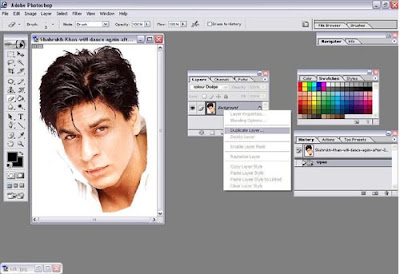


You may also give a pencil sketch effect to your image, and it will replicate as if you have created the sketch. The steps may seem to be a little long but don't worry only few minutes of patience will pay off ;) 
 
Just follow this simple steps.
Open the Image > In the layer palette create a duplicate image.
Then in the layer palette from the drop down menu change the Normal mode > Color dodge.
Now go to Image >Adjustment > Invert
Once you are done; go to Filter > Blur >Gaussian blur.
You might be getting an ugly image. But don't worry as pencil sketch is always black and white we need to change it to gray scale. To do this click on Image > Mode > Grayscale.
A dialogue box will open click on Flatten image. Again go to Gaussian Blur and increase the radius to 3. Then go to Edit > Fade Gaussian Blur> Select Darken in the drop down  menu button in place of Normal.
Now adjust the opacity to have a nice effect.What I have created is the picture below...



But if you don't have photoshop or you don't want to trouble the right lobe of your brain with it, but still want to have a fabulous image no need to worry there are some websites which provide a simple interface for photo editing and the best part is, they are free.


One of the most useful website to do photo editing and to cartoonize yourself  is befunky.com. All you need to do is upload a pic, edit it as you wish, see the preview and download it whenever you are satisfied. If this is not all, the website also gives you the flexibility of drawing mustaches, create canvas effects speaking bubbles and many other art effects which you will love to explore. 
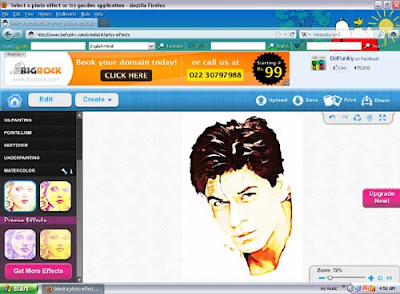


Another website is cartoonize.net where all you have to do is upload a pic and download it. Just two simple steps and nothing more. So have a great time editing.


read more...

Saturday, May 1, 2010

Generate Electricity With Every Move You Make Every Step You Take.


Have you ever wondered generating electricity merely by walking over a distance. If not then you will be amazed to know that scientist from Georgia tech University has developed a device which can generate power from body movement.

They have used Piezoelectric materials and drawn them into nanowires that can be woven into cotton shirt or housed into shoe hill. Piezoelectric crystals have a special characteristic that when they are subjected to force or pressure they produce electric signals. Though this electric signals are very weak but by cramming 20,000 nanowires into three square cm area can produce power in millivolt range.

With every move and every step you take pressure is applied on the piezoelectric crystal and electric signal starts flowing through the electrodes. It may not be possible to turn on an electrical appliance but at least atleast cellphones and ipods can be easily charged.


Single nanowires are invisible to naked eyes. Prof Z.L.Wang and his team at Georgia tech are using Zinc Oxide nanowires to built this nano generators. This nanowires are 50 to 200 nanometers in diameter and 5 micron in length. 2 thin electrodes are used and place between this 20,000 nanowires to drive current from it.

This arrangement helps to maximize the electricity produced by piezoelectric crystals. But if the zinc oxide is replaced by Gallium Nitride the power output could increase by 10 times.

If the device is not in constant motion then the nanowires will shut off and no electricity will flow. To rectify this Prof. Wang will develop supercapacitors to store the charge generated by the nanowires. 

Till now only a prototype is made and lots of work is needed to be done. It is likely to take 3-4 years before you can actually get a cloth of nanowires and put the concept into action. Till the time hold on and wait...
read more...

Monday, February 8, 2010

Designing a Simple Touch Sensor.


With the development of touch sensors new horizon of sophisticated devices evolved with reduced mechanical parts. This was advantageous in many ways because the weight, size, space requirement and ultimately cost reduced. But before putting this concept into an application, you should be first familiar with the printed design considerations. This post will help you in designing a Simple Capacitor Touch Sensor.

A simple capacitor stores energy between its two conductor plates which are separated by dielectric. But some of energy manages to spill over outside the plate area. This electric field lines are called fringing fields. The concept is to direct this fringing  field into an active sensing area accessible to user.

So the question arises how can this be done? This can be achieved by simply placing a finger near the fringing field which will add conductivity to the surface area of the capacitive system. "Wondering How?" 

The tissue of human body is filled with conductive electrolytes, covered by a layer of skin 'a lossy dielectric.' The conductive property of finger makes capacitive touch sensing possible. the additional charge storage capacity added by the finger is known as finger capacitance.

The fig shows a simple capacitive sensor button. The button diameter is kept as the diameter of the human finger ie; 10mm. The sensor pad is isolated from the ground plane by a uniform gap. The size of the gap is important because if the gap is too small, too much field energy will go directly to ground. But if it is set too large then, it becomes difficult to direct the energy through the overlay. The gap of 5mm works well for 10mm diameter button.

Whenever a finger is present on a capacitor the capacitance is increased. This concept can be put into a number of applications. The figure below shows a charge transfer touch sensor QT113 which requires a common capacitor to function. 

So you can interface the touch sensor with it and design your own system. 


read more...

Monday, January 25, 2010

Call Free From Your Cellphone. Make It SIM Free.


We keep on searching for new plans and tarrif rates to make calls at, lowest possible rates. But from now you will stop searching; as I'm going to give you some really cool trick to unlock your mobile and make it SIM free. This trick basically works for Nokia.
Either you can download this software from http://unlock.nokiafree.org/download.php or just go to this link http://www.unlock.nokiafree.org and give the details of your IMEI which you can get by dialing *#06# choose network and Nokia model number. Now click on the GET CODE button. And that's all. Enter the Code in your cell and Enjoy.

But remember you will have five chances to enter the code. So go on and enjoy. Do comment after Unlocking.
read more...

Tuesday, January 12, 2010

Firefox Hacks to Improve your Browsing speed.


If you are reading this post that means you are also a Firefox lover like me. And it's very obvious; a browser with so much of versatility and awesomeness needs to be loved. But in some occasions, it can get a bit slower in loading pages; if you are having 7-8 opened tabs spread across 2-3 windows. Oh! those annoying moments. To save you from annoyance here are some cool Firefox hacks. But before changing the settings, note down the original configuration, so that you can always restore the default if need arises. By changing the settings, you can dramatically improve the page load speed, and reduce the amount of memory Firefox uses for it's Cache when minimized . Even if You have no experience, don't be scared, just follow the simple instructions...


Increase Your Page Load Speed:-
1. Type “about:config” (Avoid Double Quotes) into Firefox Url  and hit Enter. (A warning would be displayed, override it.)


2. Alter the entries as follows: (Double Click on it)
Set “network.http.pipelining” to “true
Set “network.http.proxy.pipelining” to “true
Set “network.http.pipelining.maxrequests” to 

some number like 15. This means it will make 15 requests at once.

3. Lastly, right-click anywhere and select New- > Integer. Name it “nglayout.initialpaint.delay” and set its value to “0“.
(This value is the amount of time the browser waits before it acts on information it receives. If you’re using a broadband or a dial-up connection you’ll load pages faster now.)


4.It's Optional for even faster web browsing.
 you might have to create some of these entries by Right Click – > New– > 

Integer or String network.dns.disableIPv6: set “false
content.notify.backoffcount”: set "5";
plugin.expose_full_path”: set “true”.
“ui.submenuDelay”: set "0".


Reduce The Amount of RAM Firefox Uses For Its Cache:-

1. Type “about:config” (the double quotes should be avoided) in the url of the browser.
2. Find “browser.sessionhistory.max_total_viewer
3. Set it’s value to "0".


Reduce RAM Usage To 10MB When Firefox Is Minimized:

1. Open Firefox and go to the Address Bar. Type in "about:config" and then press Enter.
2. Right Click in the page and select New - > Boolean.
3. In the box that pops up enter “config.trim_on_minimize”. Press Enter.
4. Now select True and then press Enter.


After you are done with this then don't forget to restart Firefox. As I'm a beginner blogger, please please comment and share your love.


read more...

Saturday, January 9, 2010

The Lemon Battery Trick.


What!! Lemons can be used to generate power? Yes it can be:o This is a very easy and nice experiment you will like to perform. The only things you will require is two different types of metals (as electrodes) and one multimeter for measurement. Any possible metal can be used for example Galvanized nail and Copper coin or Magnesium wire. Copper serves as positive electrodes and galvanized nail as negative electrodes.


An electrochemical reaction between the two take place and generates a small potential difference. But it should be noted that the energy for the battery does not come from the lemon but due to the oxidation and reduction reaction between the two metals. Apple or Potato can also be used but Lemon is preferred because they are more acidic.
 

You can now check the voltage generated by connecting the multiplier probes to the two metal electrodes. The voltage will be very low. Connect several lemons in series to power standard LED.
read more...